Tools / Star Spikes
Toolbar tool
Star Spikes
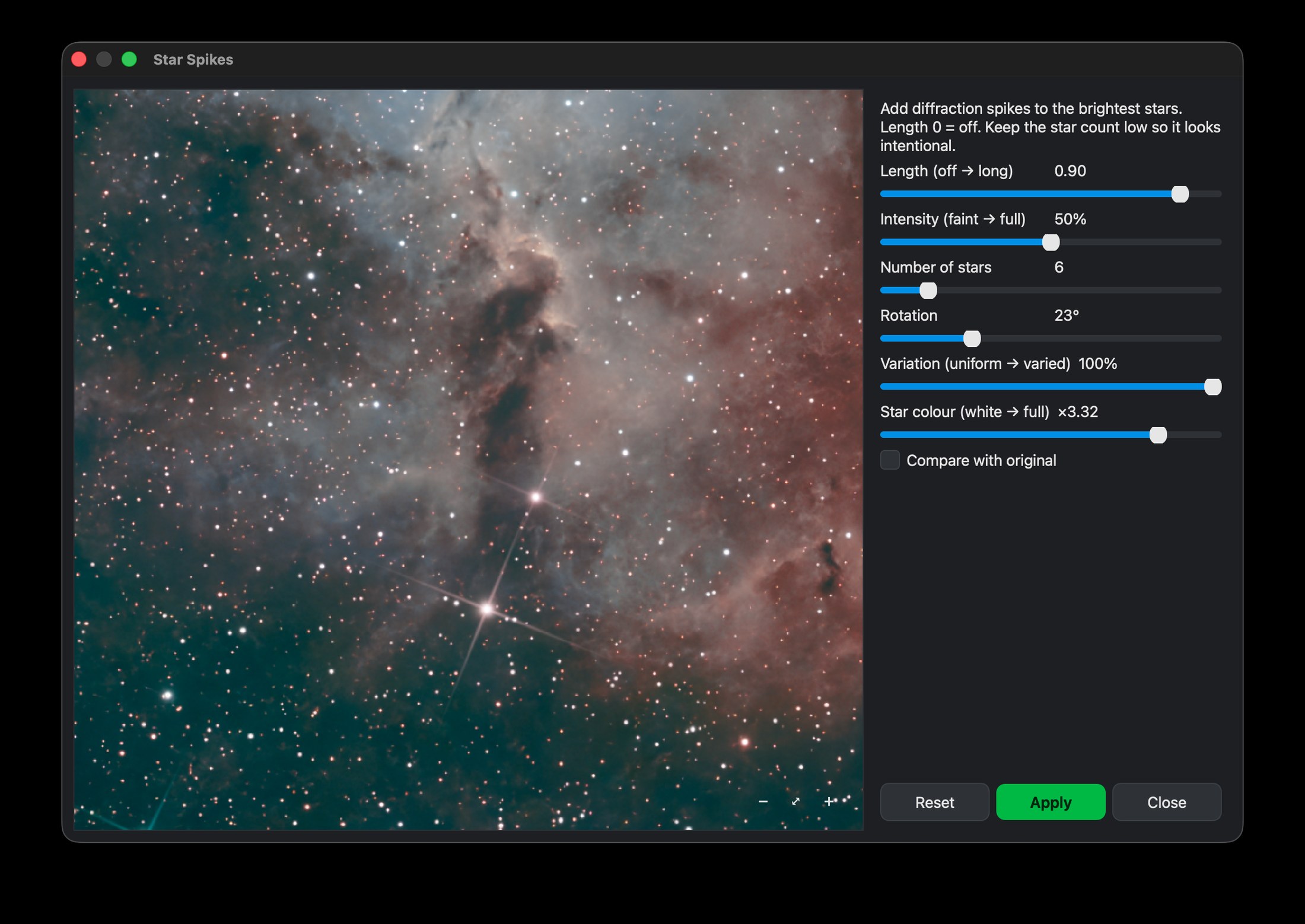
Add artistic diffraction spikes to the brightest stars — the classic reflector-telescope look, tunable with a live preview.
What it does
Star Spikes adds the four-pointed cross that a reflector telescope’s supports draw on bright stars. It is purely decorative: a finishing touch that gives a refractor picture the classic reflector look.
How to use it
- Click Star Spikes in the toolbar (on a stretched image).
- Adjust Length, Intensity, Number of stars and Rotation — the preview updates live. Variation lets each star's spikes differ a little in length, angle and brightness, so they do not look stamped from one template; Star colour sets how much of each star's own colour its spikes carry.
- Apply when you like it.
Subtle usually wins. A little length and intensity reads as elegant; a lot reads as artificial.
A word of adviceTips
It only spikes the brightest handful of stars, so the field stays clean.
Download Nocturnefree · macOS, Linux & Windows Try it on sample data
New to Nocturne? The guide walks through every step in order.